
搜索到
1
篇与
typecho 头像修复
的结果
-
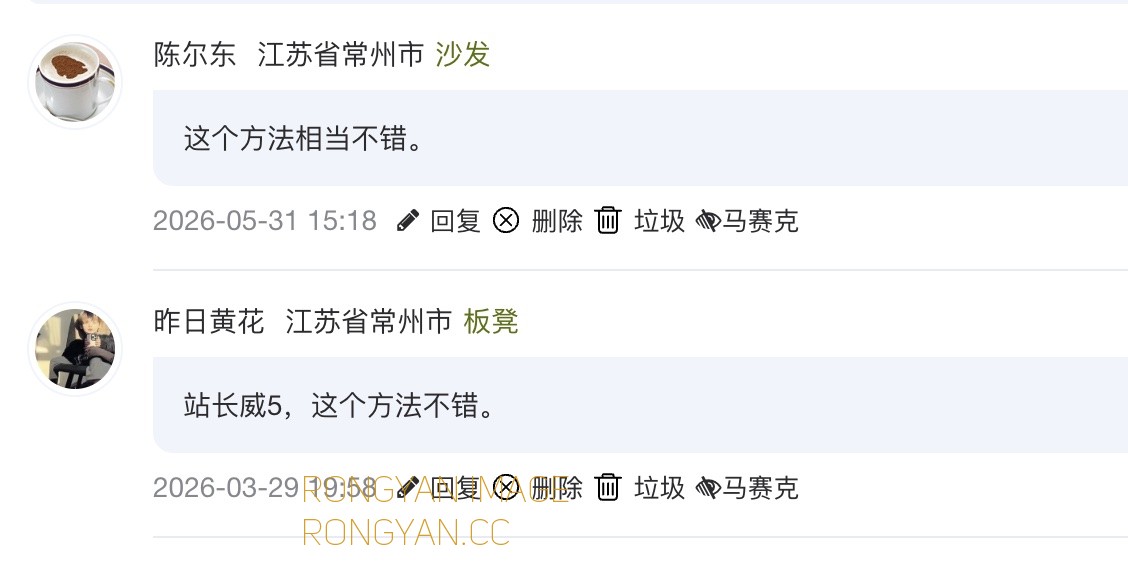
 换了新服务器&彻底解决Typecho博客头像源显示问题 序言:服务器搬家了~今天是个里程碑的日子,因为网站正式搬迁到新家落户了!虽然都是香港的服务器,但是这个是CN2,懂的都懂。为何又是香港而不是内地的服务器,懂的也都懂。和nobbcc的站长认识,他给了我JOE主题的魔改包,可惜原来的服务器上面有太多的兼容性问题,一直没能够用上。旧务器是Nginx 1.28+PHP7.4+MySQL 5.7,新服务器是Nginx 1.3+PHP8.2+MySQL8.0,刚好乘这个机会直接把主题用新版的了。有兴趣的可以去nobcc站长的博客去下载:JOE魔改主题下载地址(基于JOE 7.7.1魔改优化而来)Typecho 的头像源问题一番测试下来,感觉良好,就是有一个打从Typecho娘胎里带来的怪病(中国大陆地区水土不服),访客头像破图问题依然存在。相信用Typecho做博客的站长都知道,网上一堆的说法就是换Cravatar的解析地址。虽然我换了国内的cravatar.cn地址,可是我测试换过了依然有的访客的头像是破的,或者是灰色的(无头像,加载不了QQ邮箱头像+没有注册Cravatar头像的邮箱地址大有人在)。于是我试着解决这个问题。我用好几个邮件地址作了测试,诸如123@qq.com(这个能正常加载头像)、abc@qq.com(QQ别名邮箱地址,很难加载头像,显示破图)、abc@163\sina\gmail\msn等等,有一半的机率是灰图以及破图,很不好看。通过分析代码分析可能的原因:1、头像走的是library/avatar.php代理(服务器去下载头像再返回),服务器连不上外部源就会破图。2、QQ邮箱头像接口只能通过纯数字QQ号查询头像。诸如abc@qq.com这样的邮箱前缀不是数字,所以走不到QQ头像通道,降级到Cravatar查头像,而该邮箱没有注册 Cravatar/Gravatar,就返回了默认灰图(其它非qq.com邮箱同理)。所以我现在解决的方式是这样:1、头像函数从本地代理avatar.php改为直链cravatar.cn(QQ邮箱自动优先用QQ头像);2、非QQ邮箱同步头像源改为从cravatar.cn获取;3、在JOE主题目录下新建avatar头像目录并存放了100多张随机头像,若以上都失败(非QQ邮箱,也没在Cravatar注册头像),根据邮箱的MD5哈希值取模,从本地头像目录里选一张固定分配给该邮箱——同一个邮箱始终显示同一张图。解决方法一、先直接切回直链方式,改为直接输出 CDN 地址:1、编辑 function.php 位于/usr/themes/joe/core//* 头像函数从本地代理 avatar.php 改为直链 cravatar.cn(QQ 邮箱自动用 QQ 头像),从第311行开始 */ echo $timeTotal < 1 ? $timeTotal * 1000 . 'ms' : $timeTotal . 's'; } function _getAvatarByMail($mail) { $themeUrl = Helper::options()->themeUrl; $encodedMail = base64_encode($mail); $proxyUrl = $themeUrl . '/library/avatar.php?data=' . $encodedMail; echo $proxyUrl; } /*function _getAvatarByMail($mail) { $gravatarsUrl = Helper::options()->JCustomAvatarSource ? Helper::options()->JCustomAvatarSource : 'https://cn.cravatar.com/avatar/'; $gravatarsUrl = Helper::options()->JCustomAvatarSource ? Helper::options()->JCustomAvatarSource : 'https://cravatar.cn/avatar/'; $mailLower = strtolower($mail); $md5MailLower = md5($mailLower); $qqMail = str_replace('@qq.com', '', $mailLower); if (strstr($mailLower, "qq.com") && is_numeric($qqMail) && strlen($qqMail) < 11 && strlen($qqMail) > 4) { echo 'https://thirdqq.qlogo.cn/g?b=qq&nk=' . $qqMail . '&s=100'; } else { echo $gravatarsUrl . $md5MailLower . '?d=mm'; } };*/ }; /* 评论名片*/ function get_comment_card_info($comments) { // 静态变量缓存:确保单次请求中,相同数据只计算一次2、编辑 core.php 位于/usr/themes/joe/core//* 同步头像源默认地址改为 cravatar.cn,从第271行开始 */ function _getAvatarUrlByMail($mail) { if (empty($mail)) {$mail = '';} $gravatarsUrl = Helper::options()->JCustomAvatarSource ? Helper::options()->JCustomAvatarSource : 'https://cn.cravatar.com/avatar/'; $gravatarsUrl = Helper::options()->JCustomAvatarSource ? Helper::options()->JCustomAvatarSource : 'https://cravatar.cn/avatar/'; $mailLower = strtolower($mail); $md5MailLower = md5($mailLower); $qqMail = str_replace('@qq.com', '', $mailLower); if (strstr($mailLower, "qq.com") && is_numeric($qqMail) && strlen($qqMail) < 11 && strlen($qqMail) > 4) {3、编辑 DyUtils.php 位于/usr/themes/joe/times//* 动态评论头像源同步,从第48行开始 */ function ParseAvatar($mail) { if (function_exists('_getAvatarByMail')) return _getAvatarByMail($mail); echo "https://cn.cravatar.com/avatar/".md5(strtolower(trim($mail)))."?d=mm"; echo "https://cravatar.cn/avatar/".md5(strtolower(trim($mail)))."?d=mm"; }4、编辑 global.php 位于/usr/themes/joe/public/seting//* 后台设置说明文案同步,从第164行开始 */ NULL, NULL, '【11】自定义头像源(非必填)', '介绍:用于修改全站头像源地址 <br> 例如:https://cn.cravatar.com/avatar/ <br> 其他:非必填,默认头像源为https://cn.cravatar.com/avatar/ <br> 例如:https://cravatar.cn/avatar/ <br> 其他:非必填,默认头像源为https://cravatar.cn/avatar/ <br> https://dn-qiniu-avatar.qbox.me/avatar/<br> 注意:填写时,务必保证最后有一个/字符,否则不起作用!' ); $JCustomAvatarSource->setAttribute('class', 'joe_content joe_global');二、建立本地头像源建立joe\avatar目录,并将头像图片全部存放到此目录;三、变更头像获取机制1、编辑 function.php 位于/usr/themes/joe/core//* 通过邮箱生成头像地址,从第316行开始 */ function _getAvatarByMail($mail) { $gravatarsUrl = Helper::options()->JCustomAvatarSource ? Helper::options()->JCustomAvatarSource : 'https://cravatar.cn/avatar/'; $mailLower = strtolower($mail); $md5MailLower = md5($mailLower); $qqMail = str_replace('@qq.com', '', $mailLower); if (strstr($mailLower, "qq.com") && is_numeric($qqMail) && strlen($qqMail) < 11 && strlen($qqMail) > 4) { echo 'https://thirdqq.qlogo.cn/g?b=qq&nk=' . $qqMail . '&s=100'; } else { echo $gravatarsUrl . $md5MailLower . '?d=mm'; $index = abs(crc32($mailLower)) % 139 + 1; echo Helper::options()->themeUrl . '/avatar/avatar' . $index . '.jpg'; } }; /* 评论名片*/2、编辑 core.php 位于/usr/themes/joe/core//* 通过邮箱生成头像地址(字符串),从第272行开始 */ function _getAvatarUrlByMail($mail) { if (empty($mail)) {$mail = '';} $gravatarsUrl = Helper::options()->JCustomAvatarSource ? Helper::options()->JCustomAvatarSource : 'https://cravatar.cn/avatar/'; $mailLower = strtolower($mail); $md5MailLower = md5($mailLower); $qqMail = str_replace('@qq.com', '', $mailLower); if (strstr($mailLower, "qq.com") && is_numeric($qqMail) && strlen($qqMail) < 11 && strlen($qqMail) > 4) { return 'https://thirdqq.qlogo.cn/g?b=qq&nk=' . $qqMail . '&s=100'; } else { return $gravatarsUrl . $md5MailLower . '?d=mm'; $index = abs(crc32($mailLower)) % 139 + 1; return Helper::options()->themeUrl . '/avatar/avatar' . $index . '.jpg'; } } /*逻辑说明:1、QQ 数字号邮箱 → QQ 头像(不变)2、其他邮箱 → 有avatar显示avatar头像,没有则邮箱 CRC32哈希值对本地头像取模,固定分配一张本地头像;并且同一个邮箱永远只显示同一张头像。前后对比:四、修改好的文件包下载(注意这是基于nobb站长的Joe魔改主题包而作的修改,其它版本的joe主题请自行测试),回复可见